The protocol's wallet
Templar Wallet.
- Open source
- Easy
- Guided
Bitcoin and Liquid in one app. Your keys stay yours, and they sign on Templar Lend too.
Alpha · test network
Available for
- macOS
- Windows
- Linux
- Android
Test network only, with coins that have no value.
What this means
Today
- Bitcoin and Liquid on testnet.
- Signs Templar Lend loans from a computer.
In progress
- Loan signing on Android.
- The iOS app.
- Mainnet, after the checks.
The wallet in action

Your balance
Bitcoin and Liquid together, in your currency or in sats.

Sending
Six steps, and a drawing of the transaction before you sign.

Your coins
Label, freeze or merge individual coins.

Multisig and hardware wallets
Several signatures to spend, hardware wallets included.

Assets on Liquid
Confidential amounts, your own assets and LiquiDEX swaps.

How it's built
Screens in Flutter, engine in Rust, recovery phrases encrypted.

Sign for Templar Lend
The site prepares the loan; you check and sign in the wallet.
The animated tour is in the desktop version.
Bitcoin and Liquid on the first screen.
Net worth
The total in sats or seven currencies, charted over time.
One card per network
Bitcoin shows your latest activity, Liquid the assets you hold.
Hidden amounts
One tap on the eye hides the figures, except the ones you sign.
Light or dark
The sun at the bottom left switches the theme.
Six steps, one question at a time. You sign with your password or Touch ID.
New or co-signed
Co-signing passes the transaction from one signer to the next.
Which network
On Liquid one transaction can pay in several assets.
Which coins
By hand, to keep different sources apart. On Liquid it is automatic.
Recipients
Paste or scan the address. One more output pays a second person.
The fee
Pay more and it gets into a block sooner. On Liquid it is flat and tiny.
The review
Three arrows: to the recipient, to your change, to the fee.
Each coin is a banknote, bigger when it is worth more.
Sizes
Dust is worth less than the fee to spend it, and the wallet flags it.
A label
The name stays on this device, never on the blockchain.
Freeze
It stays in your balance, but the wallet will not spend it, whoever asks.
Merge
The coins you pick become one, through the same review as a send.
Several signatures to spend, with keys in the app or on a hardware wallet.
One key or several
Several keys for large sums, or for funds shared by several people.
The threshold
Up to nine keys, and one can be created here.
Cable or QR
Jade and Ledger by cable, SeedSigner by QR. On Liquid, Jade and software keys sign.
A lost key
With 2 of 3, the other two still sign.
A stolen key
On its own, it cannot spend anything.
The network beside Bitcoin: a block a minute, and assets anyone can issue.
Confidential amounts
Anyone watching sees the transactions, not the amounts or assets.
Issue an asset
The domain ties the asset to your website: anyone can check who issued it.
Supply and reissuance
In base units: with 2 decimals, 100,000 becomes 1,000.00 TEST.
Reissue or burn
Whoever holds the reissuance token can raise the supply; burning lowers it.
Swaps on LiquiDEX
One transaction: both assets move, or neither does.
Three layers, one inside the other: the x-ray pulls them apart.
The shell
Screens written once in Flutter, the same on desktop and Android.
The engine underneath
In Rust, on your device: it builds and signs transactions.
The vault
Without the app password, the recovery phrases on disk are unreadable.
The engine · Rust
BDK 0.30 · BitcoinLWK 0.9 · LiquidPSBT / PSET
balancesaddressescoin selectionsigningsync
The vault
- Argon2id + XChaCha20-Poly1305
- Touch ID on a Mac, fingerprint on Android
- Auto-lock
The site prepares the loan. You check it and sign in the wallet.
Connect once
The site sees balance and activity and prepares loans, but cannot spend.
The link
The button on the site opens the request in the wallet, without a browser extension.
Compare
You check: the amount and the collateral must match in both columns.
Sign
Your signature goes to the site, which adds the other party's and broadcasts the transaction.
How it compares to other wallets
| Feature |  Templaralpha · testnet Templaralpha · testnet | Blockstream appphone and computer | Sparrowcomputer | AQUAphone |
|---|---|---|---|---|
| Bitcoin | Yes. on-chain and Miniscript | Yes. on-chain and Lightning | Yes. on-chain | Yes. on-chain and Lightning |
| Liquid | Yes. L-BTC and other assets | Yes. regulated assets too (AMP) | No. Bitcoin only, by choice | Yes. L-BTC and USDt |
| Software and hardware signers | Yes. on Liquid, Jade only | Yes. Jade, Ledger, Trezor and more | Yes. USB, QR, SD and smartcard | Partly. software key only |
| Multisigspending takes more than one signature | Yes. M-of-N on Liquid too | Partly. Blockstream holds one key | Yes. M-of-N with your keys | No. a single key |
| Send and receive Liquid assets | Yes. any asset, multisig too | Yes. any asset | No. no Liquid | Partly. only assets on its list |
| LiquiDEXtwo people swap assets in one transaction | Yes. single-key wallets only | No. bitcoin swaps only | No. no Liquid | No. swaps via SideSwap and Boltz |
| Issue, reissue and burn assetscreate an asset and change its supply | Yes. single-key wallets only | No. with Elements Core, outside the app | No. no Liquid | No. no issuance |
| Guided steps for multisig, hardware and assets | Yes. for all three | Partly. hardware and 2FA, no issuance | Partly. multisig and hardware, no assets | No. no multisig or hardware |
Checked on 27 September 2026 against official sites, help pages and code.
Sources, and why these three
The Blockstream app is the most mature with Liquid, Sparrow the desktop reference, AQUA the easiest on a phone.
- Templar github.com/0xB4LdW1n/TemplarWallet
- Blockstream app blockstream.com/app · help.blockstream.com
- Sparrow sparrowwallet.com/docs · no Liquid, by choice
- AQUA aqua.net · source code
Download Templar Wallet
macOS
- File
- .dmg
- Processor
- Apple silicon and Intel
- System
- macOS 10.15 or later
Alpha · test network · not notarized
Download for macOSOn first launch macOS asks you to open it anyway. How to →
Windows
- File
- installer .exe
- Processor
- x64
- System
- Windows 10 (1809+) or 11
Alpha · test network · unsigned build
Download for WindowsOn first launch SmartScreen asks you to confirm. How to →
Verify the download ·portable .zip (does not open protocol links)
Linux
- File
- .tar.gz
- Processor
- x86-64
- System
- Ubuntu 22.04, Debian 12 or later
Alpha · test network · unsigned build
Download for LinuxExtract it and run it. How to →
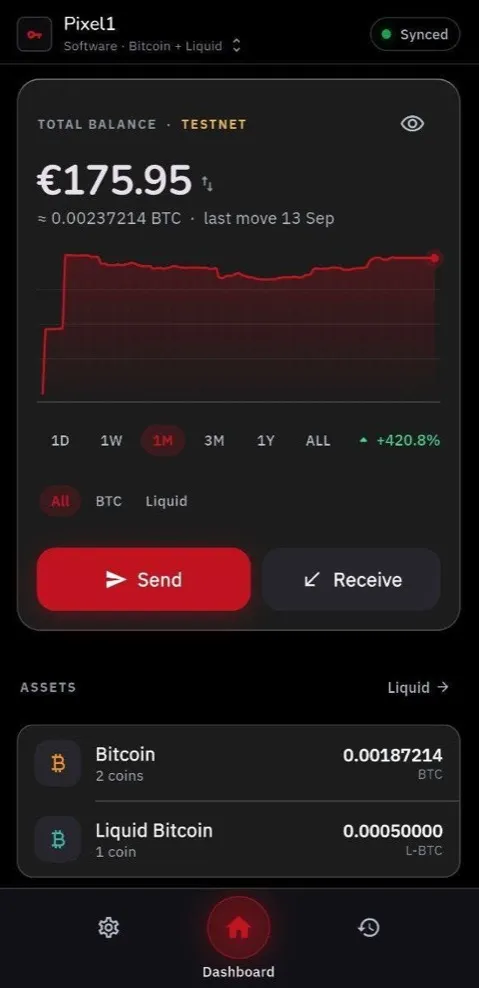
Android: the dashboard, the balance and the two networks
Android yours
In your pocket too.
The same wallet, on your phone.
- File
- .apk
- Processor
- arm64
- System
- Android 7.0 or later
Alpha · test network · does not sign loans yet
Emulator or x86_64 device? x86_64 APK · All releases
Outside Google Play: Android asks you to allow the install. How to →
Alpha · test network
Prefer to build it? From source →
The code is open source
github.com/0xB4LdW1n/TemplarWallet
Everything in one repository
The app, the engine and the protocol connector.
git clone https://github.com/0xB4LdW1n/TemplarWallet.git - Rust
- Flutter
- MIT